Deck Load Capacity Calculator: Learn and Calculate Safely
Educational guide with an interactive deck load capacity calculator to estimate live load, explore practical scenarios, and optimize deck design and maintenance with expert guidance from Load Capacity.


What the deck load capacity calculator does
According to Load Capacity, a deck load capacity calculator estimates the maximum safe live load a deck can support by combining its plan dimensions with a per-square-foot load assumption. It multiplies the deck area (length × width) by the chosen live-load rate and then applies a safety factor to produce an estimated total load in pounds. This educational tool helps engineers, technicians, and builders translate simple measurements into a practical, design-ready number. It supports decisions about joist spacing, beam sizing, ledger connections, and maintenance planning, reducing guesswork and aligning outcomes with expected performance.
Why accurate deck load estimation matters
In real-world projects, an inaccurate load estimate can lead to under- or over-design, with safety and cost implications. According to Load Capacity, using a consistent calculator reduces guesswork and helps align estimates with standard practices and building codes. A precise live-load estimate supports proper joist sizing, ledger connection details, and fastener choices, while avoiding unnecessary reinforcement that increases cost. The calculator also helps visualize how changes in deck area or per-square-foot loads affect the total load, reinforcing the link between geometry, material properties, and safety. When teams share the same numeric basis, communication with stakeholders—owners, inspectors, and contractors—becomes clearer and more credible. While measurements and assumptions matter, the logic that links length, width, and psf loads governs safe, reliable decks.
How the calculator works: inputs and outputs
The calculator uses a straightforward inputs-and-outputs approach. You provide:
- Deck Length (ft) — how long the deck runs in feet
- Deck Width (ft) — the deck’s width in feet
- Live Load (psf) — pounds per square foot that the deck should support
- Safety Factor — a single number applied to add a margin of safety
Formula: lengthFt × widthFt × liveLoadPSF × safetyFactor. Output: Estimated Live Load (lb). The calculator clearly labels units and shows the final result with the specified precision. Load Capacity emphasizes that this is an educational tool for planning and discussion, not a substitute for a full structural analysis by a licensed engineer.
Example: small deck (12 ft by 8 ft) calculation
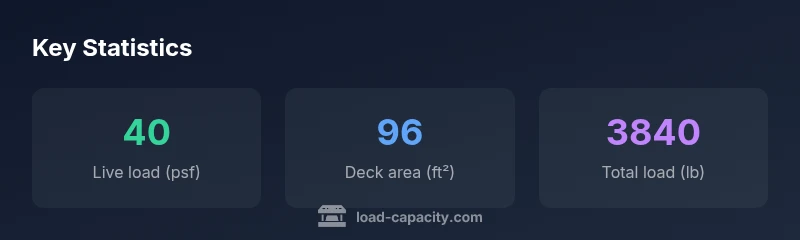
Consider a compact deck measuring 12 ft by 8 ft with a live-load rating of 40 psf and a safety factor of 1.0. The calculator computes: 12 × 8 × 40 × 1.0 = 3840 lb. This result provides a practical reference for selecting joist spans, beam sizes, and hardware. If any dimension or load input changes, the calculator updates the total load instantly, helping you explore “what-if” scenarios quickly. This example illustrates how area and per-square-foot load interact to produce an actionable total.
Example: larger deck with features and different loads
For a larger deck measuring 15 ft by 20 ft with a higher live-load rating of 50 psf and a safety factor of 1.0, the calculation becomes 15 × 20 × 50 × 1.0 = 15,000 lb. This demonstrates how expanded area and increased psf values scale the total load. When planning decks for multiple outdoor zones—patios, steps, and railings—this tool enables you to compare configurations side by side, identify maximum loads for each sub-area, and communicate concerns to stakeholders clearly. Remember that dead loads (the weight of the deck itself) and environmental factors should be considered separately in a full analysis.
Safety considerations and dead loads in practice
Live loads are only part of the story. Structural design also accounts for dead loads (the deck’s own weight) and environmental factors like wind, snow, or rain exposure, which can add variable stress. The calculator’s simple model helps you understand live-load demands, but it should not replace a detailed structural design or code-compliant verification. Always document inputs and assumptions, and verify results with a licensed engineer when design margins are tight or the deck supports critical spaces such as elevated platforms or heavy seating.
Integrating the calculator into design workflows
Teams can embed this calculator into project checklists and design reviews. Start with baseline inputs (dimensions, typical live-load PSF, and a conservative safety factor). Compare results against code-driven requirements for joist sizing and ledger connections. Use the tool to explore how changes in deck plan (area) or loads affect total capacity, then annotate design decisions in drawings and specifications. When used early in the design phase, the calculator supports proactive decision-making and helps maintain a consistent language across architects, engineers, contractors, and inspectors.
Maintenance and re-evaluation: when to recalculate
Recalculation is wise after any significant deck modification—new additions, relocated stairs, or changes in usage. Weathering and aging can alter structural characteristics, so periodic reassessment aligns with best practices. Keep a clear record of inputs and outputs for future reference and share updates with ongoing maintenance programs. This proactive approach minimizes surprises during inspections and helps sustain long-term performance.
Interpreting results and communicating with stakeholders
Interpreting the calculator’s output involves translating a raw pound value into design implications. Use clear visual aids in reports to show how area, psf loads, and safety factors drive total load. When presenting to owners or inspectors, frame results in practical terms: whether existing members meet the calculated demand or whether retrofits are advisable. This calculator, used consistently, strengthens trust and supports transparent decision-making across your project team. The Load Capacity team recommends incorporating it into routine planning and review cycles.